

How To Read Deleted WhatsApp Messages?
To read deleted WhatsApp messages follow the steps
- Go to the Home Screen on your Android phone.
- Tap and hold somewhere in the free area on the screen.
- Tap widgets, and find the Settings widget on the list.
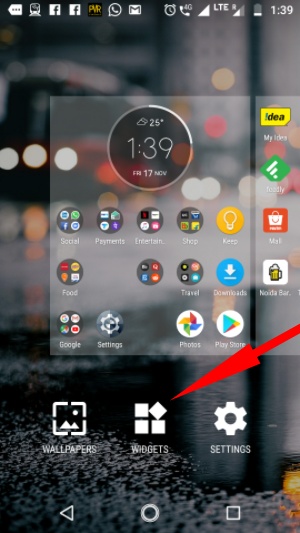
- Now, tap and hold the Settings widget and place it anywhere on the home screen. A list of available options would appear next.
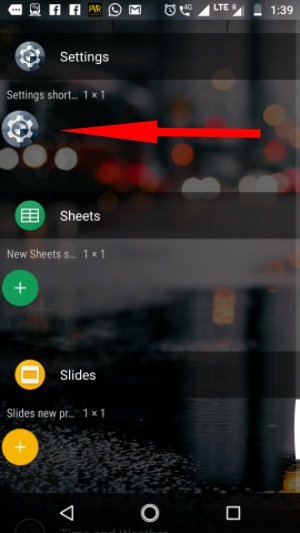
- Scroll down and select Notification Log.
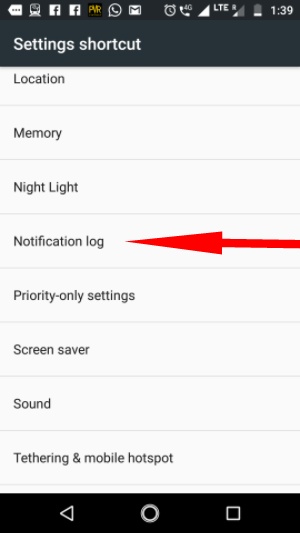
Now, tapping that new Settings icon on the Home Screen would show Android notifications from the past and also the deleted WhatsApp messages which were displayed as notifications.
Another way to read deleted WhatsApp messages is by downloading an Android app from Google Play called Notification History.
Before you start worrying about other people reading the WhatsApp messages you unsent, there is a twist in the story. People can only read those deleted WhatsApp messages which they have interacted with. For instance, if they tap or swipe an incoming notification or see the message by visiting the app. Otherwise, for the notifications which they didn’t see, you can take a breath of relief.
Post a Comment